#!/usr/bin/env ruby -w
#ruby 2.0.0 tested.
#Using mechanize,which is very very awesome gem.
#Must install gem. ex) gem install mechanize
#This short script get the nytimes.com editorial and link each word to webster dictionary.
#My personal purpose.
require 'mechanize'
agent=Mechanize.new
url='http://www.nytimes.com/2015/01/28/opinion/a-new-chapter-for-america-and-india.html?ref=opinion&_r=0'
page = agent.get(url)
#page = agent.get('http://www.nytimes.com/2015/01/28/opinion/a-new-chapter-for-america-and-india.html?ref=opinion&_r=0')
# Getting title by scan and join
title=url.match(/\w+-[\w+-]+/).to_s.gsub("-"," ").capitalize
content=page.body
# scan nytimes editorial content by ptag to array
contents=content.scan(/\<p class=\"story-body-text story-content\".*>*\<\/p\>/)
header=%q{<html><body><meta http-equiv="Content-Type" content="text/html; charset=UTF-8"><style type="text/css">
a { text-decoration:none; color : #000; }
</style> }
footer=%q{</body></html>}
puts "#{header}"
puts "<h1><center>#{title}</center></h1>"
for i in 0..(contents.size-1)
# removal of html tag
contents[i] = contents[i].gsub(/<.[^>]+>/,'')
# link to each word to merriam-webster dictionary
contents[i]=contents[i].gsub(/\w+|\w+\./) {|s| "<a href=http://www.merriam-webster.com/dictionary/#{s}>#{s}</a>"}
print " #{contents[i]}"
puts "<p>"
end
#Footer
puts "#{footer}"
Friday, January 30, 2015

Wednesday, January 28, 2015
Benchmark scan and match
2.0.0-p598 :001 > require 'benchmark'
=> true
2.0.0-p598 :002 > url='http://www.nytimes.com/2015/01/28/opinion/a-new-chapter-for-america-and-india.html?ref=opinion&_r=0'
=> "http://www.nytimes.com/2015/01/28/opinion/a-new-chapter-for-america-and-india.html?ref=opinion&_r=0"
2.0.0-p598 :003 > Benchmark.bmbm(100) do |b|
2.0.0-p598 :004 > b.report("scan function") do
2.0.0-p598 :005 > title = url.scan(/\w+-[\w+-]+/).join.gsub("-"," ").capitalize
2.0.0-p598 :006?> end
2.0.0-p598 :007?> b.report("match function") do
2.0.0-p598 :008 > title = url.match(/\w+-[\w+-]+/).to_s.gsub("-"," ").capitalize
2.0.0-p598 :009?> end
2.0.0-p598 :010?> end
Rehearsal ----------------------------------------------------------------------------------------------------------------------------------------
scan function 0.000000 0.000000 0.000000 ( 0.000113)
match function 0.000000 0.000000 0.000000 ( 0.000092)
------------------------------------------------------------------------------------------------------------------------------- total: 0.000000sec
user system total real
scan function 0.000000 0.000000 0.000000 ( 0.000052)
match function 0.000000 0.000000 0.000000 ( 0.000033)
=> [#<Benchmark::Tms:0x00000002083930 @label="scan function", @real=5.2013e-05, @cstime=0.0, @cutime=0.0, @stime=0.0, @utime=0.0, @total=0.0>, #<Benchmark::Tms:0x00000002083778 @label="match function", @real=3.2601e-05, @cstime=0.0, @cutime=0.0, @stime=0.0, @utime=0.0, @total=0.0>]
=> true
2.0.0-p598 :002 > url='http://www.nytimes.com/2015/01/28/opinion/a-new-chapter-for-america-and-india.html?ref=opinion&_r=0'
=> "http://www.nytimes.com/2015/01/28/opinion/a-new-chapter-for-america-and-india.html?ref=opinion&_r=0"
2.0.0-p598 :003 > Benchmark.bmbm(100) do |b|
2.0.0-p598 :004 > b.report("scan function") do
2.0.0-p598 :005 > title = url.scan(/\w+-[\w+-]+/).join.gsub("-"," ").capitalize
2.0.0-p598 :006?> end
2.0.0-p598 :007?> b.report("match function") do
2.0.0-p598 :008 > title = url.match(/\w+-[\w+-]+/).to_s.gsub("-"," ").capitalize
2.0.0-p598 :009?> end
2.0.0-p598 :010?> end
Rehearsal ----------------------------------------------------------------------------------------------------------------------------------------
scan function 0.000000 0.000000 0.000000 ( 0.000113)
match function 0.000000 0.000000 0.000000 ( 0.000092)
------------------------------------------------------------------------------------------------------------------------------- total: 0.000000sec
user system total real
scan function 0.000000 0.000000 0.000000 ( 0.000052)
match function 0.000000 0.000000 0.000000 ( 0.000033)
=> [#<Benchmark::Tms:0x00000002083930 @label="scan function", @real=5.2013e-05, @cstime=0.0, @cutime=0.0, @stime=0.0, @utime=0.0, @total=0.0>, #<Benchmark::Tms:0x00000002083778 @label="match function", @real=3.2601e-05, @cstime=0.0, @cutime=0.0, @stime=0.0, @utime=0.0, @total=0.0>]
Sunday, January 25, 2015
inject example(fibonacci,factorial)
### plus from min to max ###
2.0.0-p598 :018 > def fib(min,max)
2.0.0-p598 :019?> a=min.upto(max).inject(:+)
2.0.0-p598 :020?> a
2.0.0-p598 :021?> end
=> nil
2.0.0-p598 :022 > fib(1,4)
=> 10
2.0.0-p598 :023 > fib(-1,4)
=> 9
### multiple from min to max###
2.0.0-p598 :028 > def fact(min,max)
2.0.0-p598 :029?> a = min.upto(max).inject(:*)
2.0.0-p598 :030?> a
2.0.0-p598 :031?> end
=> nil
2.0.0-p598 :032 > fib(1,4)
=> 10
2.0.0-p598 :033 > fact(1,4)
=> 24
Very simple....
2.0.0-p598 :018 > def fib(min,max)
2.0.0-p598 :019?> a=min.upto(max).inject(:+)
2.0.0-p598 :020?> a
2.0.0-p598 :021?> end
=> nil
2.0.0-p598 :022 > fib(1,4)
=> 10
2.0.0-p598 :023 > fib(-1,4)
=> 9
### multiple from min to max###
2.0.0-p598 :028 > def fact(min,max)
2.0.0-p598 :029?> a = min.upto(max).inject(:*)
2.0.0-p598 :030?> a
2.0.0-p598 :031?> end
=> nil
2.0.0-p598 :032 > fib(1,4)
=> 10
2.0.0-p598 :033 > fact(1,4)
=> 24
Very simple....
Saturday, January 24, 2015
ruby negative factorial and plus .
#!/usr/bin/env ruby
#ruby 2.0.0 version test
# negative factorial and plus each result number
n=ARGV[0].to_i
def n_fact(n)
if n > -1
puts "argument must be less then 0"
elsif n == -1
return n
else
return (n*n_fact(n+1))
end
end
result = n_fact(n)
puts "negative fact value : #{result}"
def nf_sum(r)
r = r.to_s
if r[0] == "-"
r1 = -(r[1].to_i)
for i in 2..(r.size-1)
puts "#{r1}+#{r[i]}=#{r1+=r[i].to_i}"
end
# putting result
puts "So last sum is = #{r1}"
else # If the result value is positive
sum = 0
r.each_char { |r| sum += r.to_i }
puts sum
end
end
nf_sum(result)
#Testing ^^;
oyj@oyjmint ~/rp $ ruby negative_fact.rb -7
negative fact value : -5040
-5+0=-5
-5+4=-1
-1+0=-1
So last sum is = -1
oyj@oyjmint ~/rp $ ruby negative_fact.rb -8
negative fact value : 40320
9
#ruby 2.0.0 version test
# negative factorial and plus each result number
n=ARGV[0].to_i
def n_fact(n)
if n > -1
puts "argument must be less then 0"
elsif n == -1
return n
else
return (n*n_fact(n+1))
end
end
result = n_fact(n)
puts "negative fact value : #{result}"
def nf_sum(r)
r = r.to_s
if r[0] == "-"
r1 = -(r[1].to_i)
for i in 2..(r.size-1)
puts "#{r1}+#{r[i]}=#{r1+=r[i].to_i}"
end
# putting result
puts "So last sum is = #{r1}"
else # If the result value is positive
sum = 0
r.each_char { |r| sum += r.to_i }
puts sum
end
end
nf_sum(result)
#Testing ^^;
oyj@oyjmint ~/rp $ ruby negative_fact.rb -7
negative fact value : -5040
-5+0=-5
-5+4=-1
-1+0=-1
So last sum is = -1
oyj@oyjmint ~/rp $ ruby negative_fact.rb -8
negative fact value : 40320
9
Friday, January 23, 2015
small ruby scripts,useful or practical?
#!/usr/bin/env ruby
#moving files *php*.pdf
d="/home/whatsup/Desktop/book2/"
de="/home/whatsup/Desktop/book2/php/"
system("find #{d} -name \"*.pdf\" | grep -i \"php\" > /tmp/phpbook")
a=File.readlines("/tmp/phpbook").each { |b| system("mv -vf \"#{b.strip}\" #{de}")}
~
#!/usr/bin/env ruby
#suming of uid
P="/etc/passwd"
i=0
sum_uid=0
a=File.readlines(P)
while i < a.size
# Getting array for each users
getuid=a[i].split(/:/)
# Getting uid for each users
uid=getuid[2]
# Getting user for each users
user=getuid[0]
# summing uids. Should convert to integer
sum_uid+=uid.to_i
i += 1
end
puts "sum of uid = #{sum_uid}"
#!/usr/bin/env ruby
#suming of uid
sum=0
File.readlines("/etc/passwd").collect {|line| sum += line.split(/:/)[2].to_i}
puts "The sum of uid is #{sum}"
#Using bash shell(gawk study)
#!/usr/bin/env bash
#Getting sum of uid on /etc/passwd file using awk(gawk)
#GNU Awk 4.0.1
TEMP_FILE="/tmp/uid"
AWK=$(which awk)
PASSFILE="/etc/passwd"
#Getting uid via awk ':' FS
$AWK -F: '{print $3}' $PASSFILE > $TEMP_FILE
#Using awk(gawk)
$AWK 'BEGIN{FS="\n"; RS=""} {
total = 0
i = 1
while (i <= NF)
{
total += $i
i++
print "Current total is=" total
print "It will increase by " $i
}
print "Total_Sum_of_uid_of_passwd file:", total
print "NF="NF
}' $TEMP_FILE
#Removing TEMP_FILE
rm -f $TEMP_FILE
#!/usr/bin/env ruby
# Sorting by uid.
# puts File.readlines("/etc/passwd").compact.sort_by {|line| line.split(/:/)[2].to_i}
# Just above line is simpler and I think it is better maybe.
p="/etc/passwd"
i=0
sort_by_uid=[]
p_array=File.readlines(p)
while i < p_array.size
# Getting array for each users
get_each=p_array[i].split(/:/)
# Getting uid for each users
uid=get_each[2]
# Getting user for each users
rest = get_each[0]+":"+get_each[1]+":"+get_each[2]+":"+get_each[3]+":"+get_each[4]+":"+get_each[5]+":"+get_each[6]
sort_by_uid << uid +":"+ rest
i += 1
end
# to sort must convert to to_i integer
sort_by_uid=sort_by_uid.sort_by { |k,s| k.to_i }
puts "Soting passwd file by uid number"
puts sort_by_uid
#moving files *php*.pdf
d="/home/whatsup/Desktop/book2/"
de="/home/whatsup/Desktop/book2/php/"
system("find #{d} -name \"*.pdf\" | grep -i \"php\" > /tmp/phpbook")
a=File.readlines("/tmp/phpbook").each { |b| system("mv -vf \"#{b.strip}\" #{de}")}
~
#!/usr/bin/env ruby
#suming of uid
P="/etc/passwd"
i=0
sum_uid=0
a=File.readlines(P)
while i < a.size
# Getting array for each users
getuid=a[i].split(/:/)
# Getting uid for each users
uid=getuid[2]
# Getting user for each users
user=getuid[0]
# summing uids. Should convert to integer
sum_uid+=uid.to_i
i += 1
end
puts "sum of uid = #{sum_uid}"
#!/usr/bin/env ruby
#suming of uid
sum=0
File.readlines("/etc/passwd").collect {|line| sum += line.split(/:/)[2].to_i}
puts "The sum of uid is #{sum}"
#Using bash shell(gawk study)
#!/usr/bin/env bash
#Getting sum of uid on /etc/passwd file using awk(gawk)
#GNU Awk 4.0.1
TEMP_FILE="/tmp/uid"
AWK=$(which awk)
PASSFILE="/etc/passwd"
#Getting uid via awk ':' FS
$AWK -F: '{print $3}' $PASSFILE > $TEMP_FILE
#Using awk(gawk)
$AWK 'BEGIN{FS="\n"; RS=""} {
total = 0
i = 1
while (i <= NF)
{
total += $i
i++
print "Current total is=" total
print "It will increase by " $i
}
print "Total_Sum_of_uid_of_passwd file:", total
print "NF="NF
}' $TEMP_FILE
#Removing TEMP_FILE
rm -f $TEMP_FILE
#!/usr/bin/env ruby
# Sorting by uid.
# puts File.readlines("/etc/passwd").compact.sort_by {|line| line.split(/:/)[2].to_i}
# Just above line is simpler and I think it is better maybe.
p="/etc/passwd"
i=0
sort_by_uid=[]
p_array=File.readlines(p)
while i < p_array.size
# Getting array for each users
get_each=p_array[i].split(/:/)
# Getting uid for each users
uid=get_each[2]
# Getting user for each users
rest = get_each[0]+":"+get_each[1]+":"+get_each[2]+":"+get_each[3]+":"+get_each[4]+":"+get_each[5]+":"+get_each[6]
sort_by_uid << uid +":"+ rest
i += 1
end
# to sort must convert to to_i integer
sort_by_uid=sort_by_uid.sort_by { |k,s| k.to_i }
puts "Soting passwd file by uid number"
puts sort_by_uid
Wednesday, January 7, 2015
My practical bash scripts.
# sort passwd by 3rd field separated by ':'
oyj@oyjmint ~ $ cat /etc/passwd | sort -t : -k 3n
# To find info detail on sort command.
oyj@oyjmint ~/rp $ info coreutils 'sort invocation' > sortm
#!/usr/bin/env bash
#
# This script is for copying file that is >= 100000 bytes to destination directory # from current directory's directories.
#
DES_DIR="/data/des/"
CUR_DIR=$(pwd)
for i in $(ls)
do
cd $i
for j in $(ls -l | awk -F ' ' '{if (($5 >= 100000)) print $9}')
do
cp -fv $j $DES_DIR
done
cd $CUR_DIR
done
###############################################
#!/usr/bin/env bash
# awk if example.
cat /etc/passwd | awk -F: '{if (($3 >= 1000)) print $0 }' | sort -k3 -t":"
###############################################
################################################
# I want to delete(rm *.png) all png file.
# There are 217941 files.
# Argument list too long ####
#########################
oyjmint images # ls -f *.png | wc -l
bash: /bin/ls: Argument list too long
0
oyjmint images # rm -f *.png
bash: /bin/rm: Argument list too long
# -f option do trick well.
oyjmint images # ls -f | wc -l
217941
# So below command did the trick.
oyjmint images # for i in $(ls -f)
> do
> if [[ ! -d $i ]]
> then
> rm -fv $i
> fi
> done
^^;
oyj@oyjmint ~ $ cat /etc/passwd | sort -t : -k 3n
# To find info detail on sort command.
oyj@oyjmint ~/rp $ info coreutils 'sort invocation' > sortm
#!/usr/bin/env bash
#
# This script is for copying file that is >= 100000 bytes to destination directory # from current directory's directories.
#
DES_DIR="/data/des/"
CUR_DIR=$(pwd)
for i in $(ls)
do
cd $i
for j in $(ls -l | awk -F ' ' '{if (($5 >= 100000)) print $9}')
do
cp -fv $j $DES_DIR
done
cd $CUR_DIR
done
###############################################
#!/usr/bin/env bash
# awk if example.
cat /etc/passwd | awk -F: '{if (($3 >= 1000)) print $0 }' | sort -k3 -t":"
###############################################
################################################
# I want to delete(rm *.png) all png file.
# There are 217941 files.
# Argument list too long ####
#########################
oyjmint images # ls -f *.png | wc -l
bash: /bin/ls: Argument list too long
0
oyjmint images # rm -f *.png
bash: /bin/rm: Argument list too long
# -f option do trick well.
oyjmint images # ls -f | wc -l
217941
# So below command did the trick.
oyjmint images # for i in $(ls -f)
> do
> if [[ ! -d $i ]]
> then
> rm -fv $i
> fi
> done
^^;
Friday, December 26, 2014
How to about gitolite and connnection to gitolite from eclipse IDE.

Prerequisites:
- Workstation(I used Linux Mint 17.1 Rebecca \n \l). This is also gitadmin
- Vagrant-https://www.vagrantup.com/
- Virtualbox installation-http://virtualbox.org
- Eclipse for linux: http://eclipse.org
- http://www.eclipse.org/downloads/download.php?file=/technology/epp/downloads/release/luna/SR1/eclipse-jee-luna-SR1-linux-gtk-x86_64.tar.gz
- Jdk for linux:http://www.oracle.com/technetwork/java/javase/downloads/jdk7-downloads-1880260.html
* Testing java installation.
oyj@oyjmint ~ $ java -version
java version "1.7.0_60"
Java(TM) SE Runtime Environment (build 1.7.0_60-b19)
Java HotSpot(TM) 64-Bit Server VM (build 24.60-b09, mixed mode)
Eclipse Java EE IDE for Web Developers.
Version: Luna Service Release 1 (4.4.1)
Build id: 20140925-1800
1. gitolite
Gitolite enables us to make central git repository server.
2.Preparation two ubuntu servers.
I did build vagrant package.box beforehand to /home/oyj/vt/package.box
Here is Vagrantfile. To run vagrant, virtualbox installation is necessary. My virtualbox version is
oyj@oyjmint$ mkdir gt
oyj@oyjmint$ cd gt
oyj@oyjmint ~/gt $ cat Vagrantfile
# -*- mode: ruby -*-
# vi: set ft=ruby :
# Vagrantfile API/syntax version. Don't touch unless you know what you're doing!
VAGRANTFILE_API_VERSION = "2"
Vagrant.configure(VAGRANTFILE_API_VERSION) do |config|
config.vm.define "gitolite" do |gol|
gol.vm.box = "gitolite"
gol.vm.box_url = "file:///home/oyj/vt/package.box"
gol.vm.provision "shell", inline: "echo now time to executing shell"
gol.vm.provision "shell", inline: "echo timezone config; echo 'Asia/Seoul' > /etc/timezone && dpkg-reconfigure --frontend noninteractive tzdata"
gol.vm.network "private_network", ip:"10.0.0.10"
gol.vm.host_name = "gitolite"
gol.vm.provider :virtualbox do |vb|
vb.customize ["modifyvm", :id, "--memory", "256"]
end
end
end
*Vagrant up would do some magic.
To build gitolite easily again, I made chef recipe.
If you know howabout on Chef, maybe helpful.
3. gitolite installation.
*From workstation
oyj@oyjmint ~ $ ssh-keygen -t rsa
Generating public/private rsa key pair.
Enter file in which to save the key (/home/oyj/.ssh/id_rsa):
/home/oyj/.ssh/id_rsa already exists.
Overwrite (y/n)? y
Enter passphrase (empty for no passphrase):
Enter same passphrase again:
Your identification has been saved in /home/oyj/.ssh/id_rsa.
Your public key has been saved in /home/oyj/.ssh/id_rsa.pub.
The key fingerprint is:
24:34:1f:97:43:0e:28:8e:b8:a0:4f:11:35:22:2d:7f oyj@oyjmint
The key's randomart image is:
+--[ RSA 2048]----+
|....o o.o.o. |
|..o..o.o =o |
| + + .. o .. |
|o + E o |
|o. o S |
|o . |
| o |
| . |
| |
+-----------------+
* Copy the id_rsa.pub file to the gitolite server
oyj@oyjmint ~ $ cat .ssh/id_rsa.pub
ssh-rsa aC1yc2EAAAADAQABAAABAQCdePGzfzkXWq/jWsAPgple3t2t8SX9ATiNdihc7i4DlOfIh5hxlAHweyVdePRueYS1xRm+V5wYS4lCa1eMoH23X6U6IUGuPvvnlwZVjWCuSLHHZtd+FetiJeL8Iz9Kj1OIooqEIl141bo6JKI9Ue9logMRN7DMMlXuRo5rzGCr4rF8LY08lKeRi2nOtYeXH/Sv8eZZMUTr0UTXNdvXQkAHEduwpOXQK9LFHr4U4stM+/zTB8GjR2eIaL7O8jpVyJd+DKK92CNp8JW8NkKx6T6LbUVwYEfLU9w2CvcTMD3yAQr8dOv7YBFZ9Q3z3nvxeaK31sAx0rNkYbZmN/VuJZNj
oyj@oyjmint
On gitolite server. There are other methods to copy public key such as scp,sftp etc.
Just simple copy and paster would be enough here.
git@gitolite:~$ vi oyj.pub
ssh-rsa
AAAAB3NzaC1yc2EAAAADAQABAAABAQCdePGzfzkXWq/jWsAPgple3t2t8SX9ATiNdihc7i4DlOfIh5hxlAHweyVdePRueYS1xRm+V5wYS4lCa1eMoH23X6U6IUGuPvvnlwZVjWCuSLHHZtd+FetiJeL8Iz9Kj1OIooqEIl141bo6JKI9Ue9logMRN7DMMlXuRo5rzGCr4rF8LY08lKeRi2nOtYeXH/Sv8eZZMUTr0UTXNdvXQkAHEduwpOXQK9LFHr4U4stM+/zTB8GjR2eIaL7O8jpVyJd+DKK92CNp8JW8NkKx6T6LbUVwYEfLU9w2CvcTMD3yAQr8dOv7YBFZ9Q3z3nvxeaK31sAx0rNkYbZmN/VuJZNj
oyj@oyjmint
Ubuntu server comes with perl installation basically, but if not, better install with apt-get.
oyj@oyjmint ~/gt $ vagrant ssh gitolite
Welcome to Ubuntu 14.04.1 LTS (GNU/Linux 3.13.0-40-generic x86_64)
* Documentation: https://help.ubuntu.com/
System information disabled due to load higher than 1.0
Get cloud support with Ubuntu Advantage Cloud Guest:
http://www.ubuntu.com/business/services/cloud
0 packages can be updated.
0 updates are security updates.
vagrant@gitolite:~$ which perl
/usr/bin/perl
vagrant@gitolite:~$ sudo apt-get -y install git
Reading package lists... Done
Building dependency tree
Reading state information... Done
The following extra packages will be installed:
git-man liberror-perl
Suggested packages:
git-daemon-run git-daemon-sysvinit git-doc git-el git-email....................
vagrant@gitolite:~$ sudo groupadd git
vagrant@gitolite:~$ sudo useradd git -m -d /home/git -g git
vagrant@gitolite:~$ id git
uid=1002(git) gid=1002(git) groups=1002(git)
vagrant@gitolite:~$
vagrant@gitolite:~/gitolite$ sudo su - git
git@gitolite:~$ git clone git://github.com/sitaramc/gitolite
Cloning into 'gitolite'...
remote: Counting objects: 8741, done.
remote: Compressing objects: 100% (7/7), done.
remote: Total 8741 (delta 0), reused 0 (delta 0)
Receiving objects: 100% (8741/8741), 3.62 MiB | 659.00 KiB/s, done.
Resolving deltas: 100% (4953/4953), done.
Checking connectivity... done.
git@gitolite:~$ mkdir ~/bin
git@gitolite:~$ export PATH=$HOME/bin:$PATH
git@gitolite:~$ gitolite/install -ln ~/bin
git@gitolite:~$ ls ~/bin/
gitolite
git@gitolite:~$ gitolite setup -pk oyj.pub
Initialized empty Git repository in /home/git/repositories/gitolite-admin.git/
Initialized empty Git repository in /home/git/repositories/testing.git/
WARNING: /home/git/.ssh missing; creating a new one
(this is normal on a brand new install)
WARNING: /home/git/.ssh/authorized_keys missing; creating a new one
(this is normal on a brand new install)
git@gitolite:~$
From workstation
oyj@oyjmint ~ $ ssh-add
Identity added: /home/oyj/.ssh/id_rsa (/home/oyj/.ssh/id_rsa)
oyj@oyjmint ~ $ git clone git@10.0.0.10:gitolite-admin
Cloning into 'gitolite-admin'...
remote: Counting objects: 6, done.
remote: Compressing objects: 100% (4/4), done.
remote: Total 6 (delta 0), reused 0 (delta 0)
Receiving objects: 100% (6/6), done.
Checking connectivity... done.
*Adding repository
oyj@oyjmint ~ $ vi gitolite-admin/conf/gitolite.conf
repo gitolite-admin
RW+ = oyj
repo testing
RW+ = @all
repo python-web #this is the added part
RW+ = pydev # pydev user can do all
oyj@oyjmint ~ $ cd gitolite-admin/
oyj@oyjmint ~/gitolite-admin $ git commit -a -m "adding repo"
[master d1cec77] adding repo
1 file changed, 3 insertions(+)
oyj@oyjmint ~/gitolite-admin $
oyj@oyjmint ~/gitolite-admin $ git config --global push.default simple
oyj@oyjmint ~/gitolite-admin $ git push
Counting objects: 7, done.
Delta compression using up to 8 threads.
Compressing objects: 100% (3/3), done.
Writing objects: 100% (4/4), 350 bytes | 0 bytes/s, done.
Total 4 (delta 1), reused 0 (delta 0)
To git@10.0.0.10:gitolite-admin
d1cec77..4afa57d master -> master
oyj@oyjmint ~/.ssh $ ssh-keygen -t rsa -f pydev
Generating public/private rsa key pair.
Enter passphrase (empty for no passphrase):
Enter same passphrase again:
Your identification has been saved in pydev.
Your public key has been saved in pydev.pub.
The key fingerprint is:
83:30:4a:e0:d3:01:0f:64:96:d7:49:a1:db:a5:9a:74 oyj@oyjmint
The key's randomart image is:
+--[ RSA 2048]----+
|o*o.ooo |
|+o+.oo |
| oo+o . |
| ...ooo. |
| .o E. S |
| . + . |
| o |
| |
| |
+-----------------+
oyj@oyjmint ~/.ssh $ cp pydev.pub ~/gitolite-admin/keydir/
oyj@oyjmint ~/gitolite-admin $ git add .
oyj@oyjmint ~/gitolite-admin $ git status
On branch master
Your branch is up-to-date with 'origin/master'.
Changes to be committed:
(use "git reset HEAD <file>..." to unstage)
new file: keydir/pydev.pub
oyj@oyjmint ~/gitolite-admin $ git commit -a -m "adding pydev.pub"
[master 1e0e086] adding pydev.pub
1 file changed, 1 insertion(+)
create mode 100644 keydir/pydev.pub
oyj@oyjmint ~/gitolite-admin $ git push
Counting objects: 6, done.
Delta compression using up to 8 threads.
Compressing objects: 100% (4/4), done.
Writing objects: 100% (4/4), 677 bytes | 0 bytes/s, done.
Total 4 (delta 0), reused 0 (delta 0)
To git@10.0.0.10:gitolite-admin
4afa57d..1e0e086 master -> master
oyj@oyjmint ~/gitolite-admin $
As above I createed java-web repo and jdev.pub private key.
As result, final gitolite.conf is as follows.
oyj@oyjmint ~/gitolite-admin $ cat conf/gitolite.conf
repo gitolite-admin
RW+ = oyj
repo testing
RW+ = @all
repo python-web
RW+ = pydev
repo java-web # for java web
RW+ = jdev
* To use diffrent private key, I should create ~/.ssh/config file
oyj@oyjmint ~/gitolite-admin $ cat ~/.ssh/config
host gitolite
user git
hostname 10.0.0.10
port 22
identityfile ~/.ssh/jdev
host gitolite-py
user git
hostname 10.0.0.10
port 22
identityfile ~/.ssh/pydev
* If there is a new file commit in python-web repo, result will be like belows.
oyj@oyjmint ~ $ git clone git@gitolite-py:python-web
Cloning into 'python-web'...
remote: Counting objects: 12, done.
remote: Compressing objects: 100% (8/8), done.
remote: Total 12 (delta 0), reused 0 (delta 0)
Receiving objects: 100% (12/12), done.
Checking connectivity... done.
* commit and push with git.
oyj@oyjmint ~ $ git clone git@gitolite:java-web
Cloning into 'java-web'...
warning: You appear to have cloned an empty repository.
Checking connectivity... done.
* From eclipse
Version: Luna Service Release 1 (4.4.1)
* Need to edit eclipse.ini for java path like belows
oyj@oyjmint ~/eclipse $ cat eclipse.ini
-startup
plugins/org.eclipse.equinox.launcher_1.3.0.v20140415-2008.jar
--launcher.library
plugins/org.eclipse.equinox.launcher.gtk.linux.x86_64_1.1.200.v20140603-1326
-product
org.eclipse.epp.package.jee.product
--launcher.defaultAction
openFile
-showsplash
org.eclipse.platform
--launcher.XXMaxPermSize
256m
--launcher.defaultAction
openFile
--launcher.appendVmargs
-vm
/usr/local/java/bin/java
/usr/local/java/bin/java
-vmargs
-XX:MaxPermSize=256m
-Xms40m
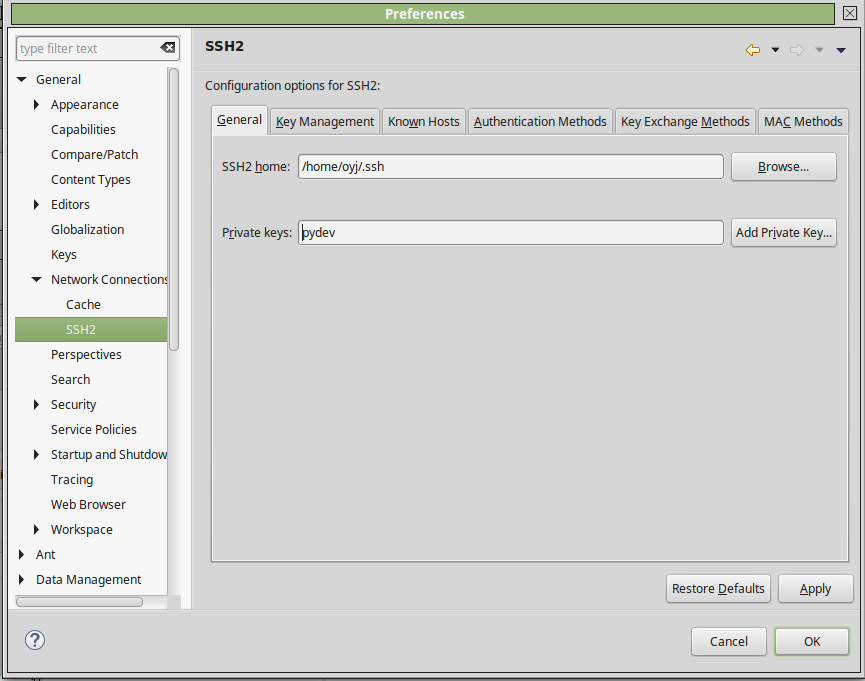
* From general tab select SSH2 and insert private key(pydev).
To be effective, should restart eclipse after setting below.
 |
| Select Git |
 |
| Select "Clone a Git repository" |
 |
| SSH connection setting |
 |
| Branch Selection to master |
 |
| Git repository setting. |
 |
| Now it is done |
Subscribe to:
Posts (Atom)